SRX MANAGER
Developed by @SRX•ALAN
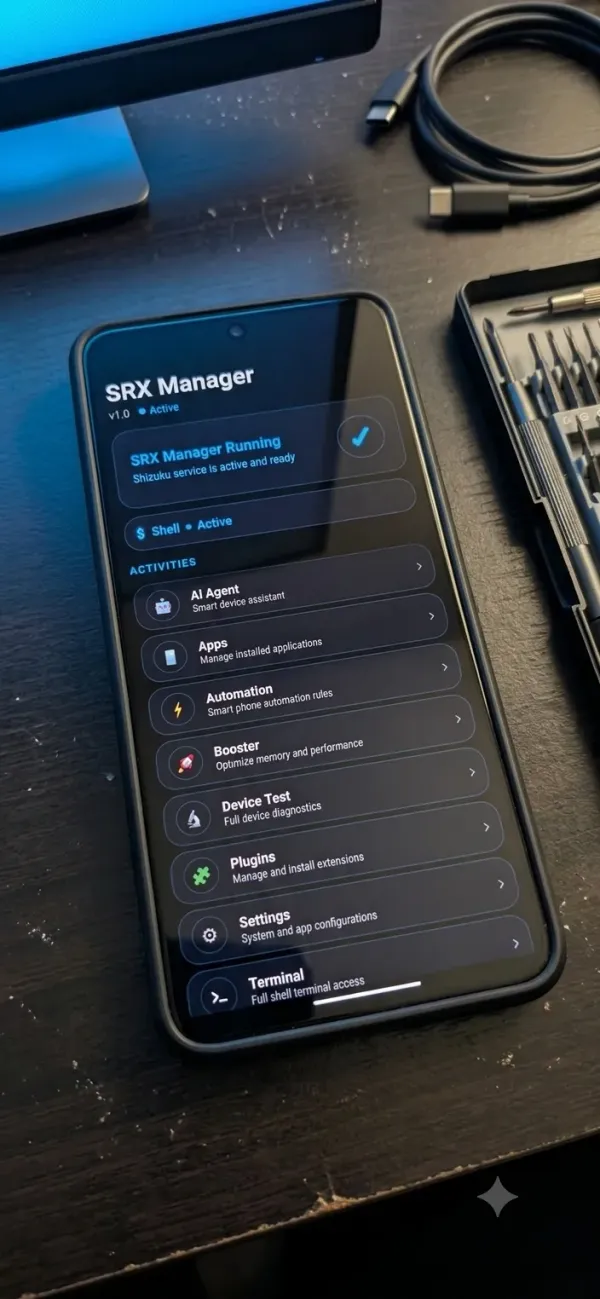
SRX Manager is a feature-rich Android system management app built for power users who want complete control over their device - without needing root access.
Whether you want to boost gaming performance, automate daily tasks, stay secure online, or get AI-powered assistance - SRX Manager brings everything into one clean, modern app.
🚀 What Can SRX Manager Do?
⚡ Game Booster
Instantly optimize your phone for gaming with one tap. Boost RAM, improve frame rates, reduce lag, and enhance your gaming experience automatically. Supports auto game mode detection so boosts activate when you launch a game.
🤖 AI Agent
Your personal AI-powered assistant built right into your phone. Ask questions, analyze photos, process documents, and get smart answers — all without leaving the app. The AI understands your device context and gives relevant, helpful responses in real time.
📱 App Manager
View every app installed on your device. Force stop, clear cache, freeze, or uninstall apps with ease. Get detailed information about each app including permissions, storage usage, and more.
💻 Terminal
A full shell terminal right on your phone. Execute commands, automate system tasks, and manage your device like a developer — all from a clean, easy-to-use interface.
⚙️ Automation
Create powerful automatic rules for your phone. Set triggers based on battery level, time of day, app launches, and more — then let SRX Manager handle the rest automatically, so you don't have to.
🛡️ VPN
Browse the internet safely and privately. SRX Manager's built-in VPN encrypts your connection and protects your online activity, giving you peace of mind wherever you are.
🔐 Security Scanner
Scan your device for threats, suspicious applications, and privacy risks. Get a full report on which apps have dangerous permissions and take action to protect yourself instantly.
💬 Worldwide Chat
Connect with SRX Manager users from around the world through a built-in real-time chat. Share tips, get help, and be part of a growing community — all inside the app.
🧩 Plugins
Expand what SRX Manager can do by installing plugins. Add new features and tools that fit exactly what you need.
🎨 Themes & Custom Icons
Make the app truly yours. Choose from multiple themes, colors, and custom icon sets to personalize every part of your SRX Manager experience.
🔒 Your Privacy & Security - Our Priority
We take your data and privacy seriously:
- ✅ Your data stays yours — We do not sell, share, or trade your personal information with any third party, ever.
- ✅ Secure login — SRX Manager uses Google Sign-In, one of the most trusted and secure login systems in the world. We never store your password.
- ✅ Encrypted storage — All your app data and preferences are stored in encrypted, secure storage on your device. No one else can read it.
- ✅ No hidden data collection — We only collect what is absolutely necessary to run the app and improve your experience. Nothing more.
- ✅ Account control — You are always in control of your account. You can delete your data or log out at any time.
- ✅ Safe communications — All communication between the app and our servers is fully encrypted and protected.
- ✅ Anti-tampering protection — SRX Manager protects itself from modification or cracking, keeping your experience safe and fair for all users.
- ✅ Maintenance transparency — If the app ever needs downtime for updates or improvements, you will see a clear maintenance notice instead of a confusing error.
- ✅ Fair usage for all — Our plan system ensures every user gets a fair, reliable experience. Limits exist to keep the service fast, stable, and available for everyone.
- ✅ Update alerts — You will always be notified when a new version is available, so you can stay up to date and protected.
📋 Requirements
- Android 8.0 (Oreo) or higher
- Shizuku app installed and running (required for App Manager, Terminal, Booster, and Automation features)
- Google account (required for Chat, AI Agent, and personalized features)
Internet connection
📌 Important Note
SRX Manager is not a Magisk module. It is a standalone Android application (APK) that uses the Shizuku framework to provide elevated system access without requiring root. This makes it safe, reversible, and compatible with all modern Android devices.
SRX Manager — Smart. Secure. Powerful.
Built with care for Android users who expect more.
Reviews (1)

No deja descargarlo