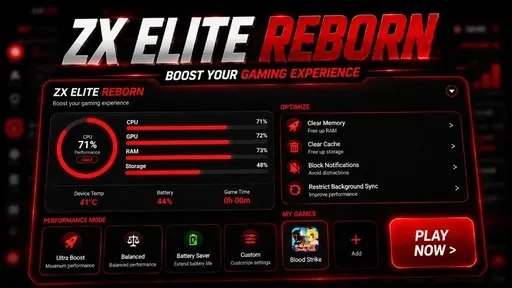
ZX ELITE REBORN is an non rooted app that operates as a dedicated Game Booster, Game Turbo, and Game Space utility. It reallocates system hardware resources, clears background RAM, and stabilizes network connection to reduce in-game latency and frame drops on Android devices.
Testing this game turbo on heavy titles like PUBG Mobile, Free Fire, MLBB and Call of Duty Mobile showed immediate stability in frame rates. Under the hood, it forcefully limits background processes to free up memory and locks network priority to keep ping low during intense firefights.
Core Features
- Dynamic RAM freeing stops resource-heavy background applications from stealing memory while gaming.
- Network priority locking directs incoming data bandwidth straight to your active game to minimize high ping spikes.
- System DND overlay blocks unwanted phone calls, app notifications, and accidental touch gestures during matches.
- Hardware performance tuning adjusts CPU and GPU frequency scaling to sustain higher frame rates.
Why Do People Use It?
Mobile gamers use ZX ELITE REBORN to strip away background system bloat and prevent sudden lag spikes during competitive matches. It gives players raw control over frame consistency and prevents sudden drop-offs in performance without requiring heavy system modifications.
Why is it Currently So Popular?
Modern games demand massive hardware overhead. With mobile e-sports growing rapidly, players need console-grade stability on budget and mid-range devices to keep up with competitive standards.
Requirements & Installation
Requirement
- Environment: Non-Root (No Root)
- Supported OS: Android 10 and above
- Shizuku: Shizuku App
Active Shizuku
- Make sure ZX ELITE REBORN App is installed.
- Turn on Wifi.
- Go to Settings& About Phone.
- Tap Build Number seven times to unlocked Developer Options.
- Then again go to the Shizuku app and tap on Pairing button.
- Click Wireless debugging & Enable Wireless debugging.
- Click Pair device with pairing code.
- Click on "Enter Pairing Code" above and paste the WiFi pairing codes there.
- Once the pairing is successful, open the Shizuku app to grant permissions and activate the ZX ELITE REBORN.
Installation
- Open your Download Foolder.
- Find the ZX ELITE REBORN APK file.
- Tap the APK file to install the app.
- Confirm the installation.