GameBoost v1 - Android Gaming Optimizer
A Shizuku-powered game booster that boosts gaming performance. Supports Android 14+. Play smarter. Boost better. Game without limits.
About GameBoost
GameBoost is an Android gaming optimization application designed to help users improve their gaming experience by managing selected system settings, reducing unnecessary background activity, and applying supported Android gaming performance features.
It provides a collection of gaming tools in one convenient interface, allowing users to configure individual games and adjust selected device settings without needing to navigate through multiple Android system menus. GameBoost is designed for gamers who want more control over their device while playing demanding mobile games.
Main Features
Game Performance Optimization
- Configure individual optimization settings for supported games
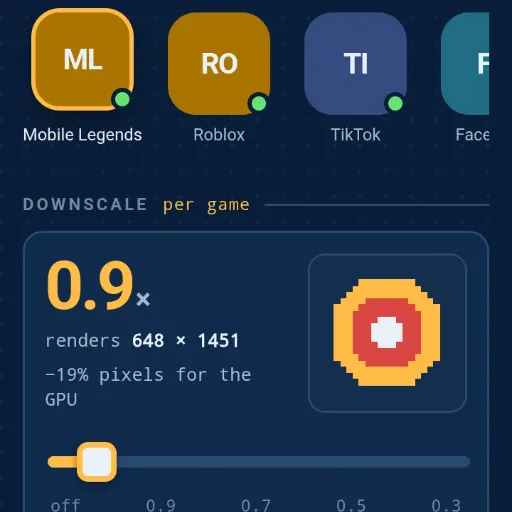
- Adjust game rendering resolution through downscaling
- Configure supported Android Game Mode performance settings
- Set available FPS caps on compatible Android versions
- Apply selected graphics-related settings
Game Library
- Scan installed applications and games
- Select games to optimize individually
- Add games manually using their package names
- Save custom optimization configurations for different games
RAM Management
- Monitor available and total device RAM
- View memory usage information
- Close selected background applications before or after launching a game
- Help free memory before demanding games start
Graphics Optimization
- Configure supported graphics rendering options
- Use ANGLE to run supported OpenGL ES applications through Vulkan
- Select available graphics driver options when supported by the device
- Configure the Android UI renderer
Gaming Environment Controls
GameBoost includes optional controls that can help create a more focused gaming environment:
- Disable Battery Saver when launching a game
- Enable Do Not Disturb while playing
- Apply Doze exemption to supported games
- Manage selected background applications
- Restore previous settings when appropriate
Display Optimization
- Adjust screen resolution
- Configure display density
- Apply temporary resolution changes for games that do not support Android Game Mode interventions
- Automatically restore supported original display settings when the game closes
- Use a safety countdown when changing screen resolution
Device Information and Diagnostics
GameBoost also provides device information and diagnostic tools, including:
- Android version
- Device model
- CPU information
- GPU information
- Vulkan compatibility
- Display resolution and density
- Refresh rate information
- Graphics driver availability
- Battery information
Restore and Safety Features
GameBoost includes a Revert All function that can restore supported settings to previously saved values. It also avoids unnecessary or unsupported performance modifications that could negatively affect device stability.
How GameBoost Works
GameBoost uses a native Android application with an integrated WebView interface. Its Android components communicate with the Shizuku service to execute supported system-level commands using Android's shell permissions. The optimization process generally works as follows:
- Step 1 - Connect Shizuku: Install and activate Shizuku, then grant GameBoost permission to communicate with it
- Step 2 - Scan Your Games: Open the Games section and scan installed applications
- Step 3 - Configure Optimization: Choose a game and configure its available resolution, FPS, graphics and launch settings
- Step 4 - Boost and Launch: Press BOOST and LAUNCH to apply the supported settings, perform the selected background cleanup, and start your game
- Step 5 - Restore Settings: When the game closes, supported temporary settings can be restored to their previous values
Compatibility
- Android 7.0 and newer (minimum SDK 24)
- Features depend on Android version and manufacturer support
- Shizuku is recommended for full functionality
- Some features require additional permissions
- Certain graphics options are available only on compatible devices
Permissions and Requirements
GameBoost uses Android permissions and Shizuku access to perform its supported optimization functions. Some operations require elevated shell access through Shizuku. Other limited functions can work using the application's own permissions.
Shizuku can be activated using Wireless Debugging on supported Android devices or through ADB/root methods. Only grant permissions that you understand and trust.
Important Information
GameBoost does not guarantee higher FPS in every game or on every Android device. Actual results depend on hardware capabilities, game optimization, Android version, GPU drivers, temperature and manufacturer restrictions.
Resolution downscaling can improve rendering performance on some devices, but may reduce image sharpness. GameBoost does not overclock the CPU or GPU, bypass hardware limitations, or guarantee that every game will support every optimization feature.
Our Goal
Our goal is to provide Android gamers with a practical, customizable and easy-to-use optimization tool. GameBoost brings gaming controls, device diagnostics, memory management and supported Android performance settings together in one application.
GameBoost v1 - Take Control of Your Gaming Experience. Developed for Android gamers who want more control over their devices.
Reviews (0)
No reviews yet. Be the first to review!