| File Name | Pixel Xpert |
|---|---|
| Size | 4.2MB |
| Version | v5.1.1 |
| Category | Magisk Modules |
| Android requirement | + 6.0 |
| Published By | Pixel Xpert Team |
| Rating | 4.9 / 5 |
| Support | A12/13/14/15/16 |
Get Link
Prerequisites:
- Compatible ROM (see Compatibility text above)
- Device Rooted with Magisk 24.2+ or KSU
- LSPosed (Zygisk Version preferred)
Installation:
- Ensure Root Access: The first prerequisite is having root access via a custom recovery.
- Install via Magisk Manager:
- Open the Magisk Manager.
- Tap on the “Modules” section.
- Click “Install from Storage” and locate the geted file.
- Confirm the installation and allow the module to apply the necessary changes.
- Reboot Your Device: After installation, reboot your device to activate the module.
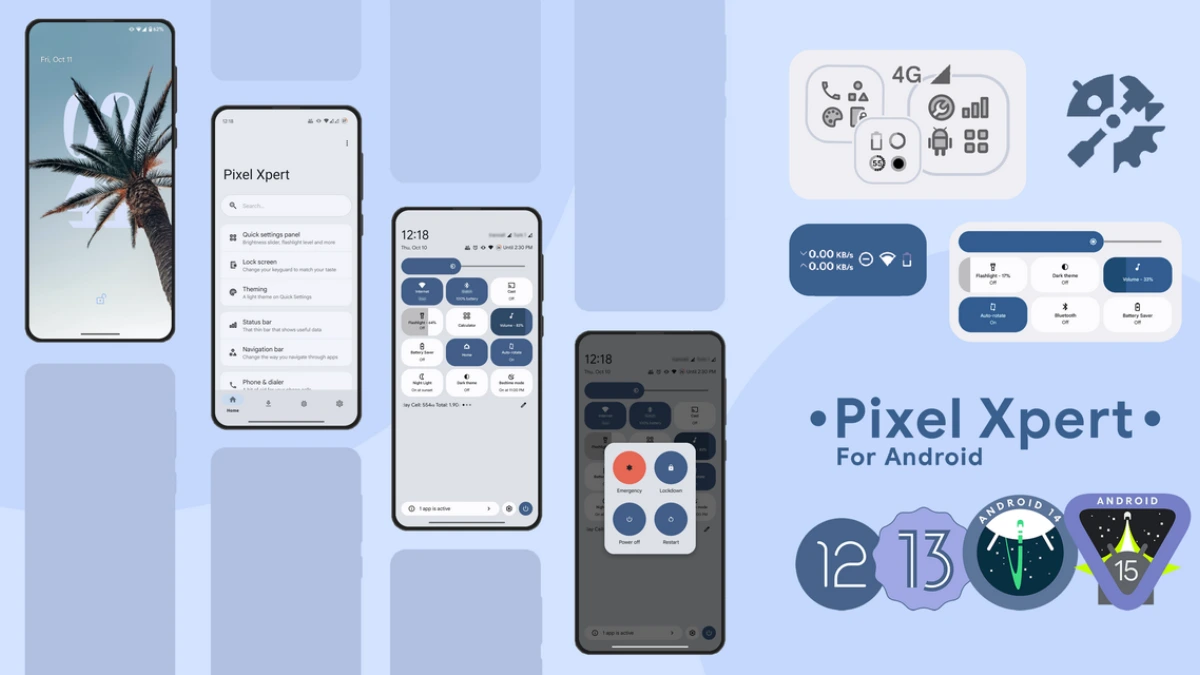
Pixel Xpert is a android magisk module. It’s best android customizer magisk module. I’ve been using the Pixel Xpert Module for a very long time now, and in my opinion, it completely changes the way you experience Android.
The standard apps provided by car makers by no means enable the full performance of our everyday cars. And with ever more demanding mobile games we sometimes need a particularly clear and optimized UI. Pixel Xpert is more than just a simple design overhaul; it offers absolute control over the entire smartphone. With Pixel Xpert our devices provide a real Pixel look, combined with maximum performance and efficiency.
Features:
- Status Bar Customize status bar icons as well as clock layouts.
- Quick Settings customization: You can change the colors of items in the Quick Settings panel as well as the styling of the grid.
- Lock Screen: You can change the lock screen shortcuts and try out some of the new typography designs.
- Notifications: Fine-tune notification backgrounds and customize your alert behaviors.
- Gesture Navigations: Tweak the gesture navigation sensitivity and get ride of that pesky navigation button.
- Phone & Dialer: Unlock extra features of the default Phone and Dialer apps, including the ability to natively record calls.
- Hotspot: Bypass annoying carrier tethering restrictions with advanced hotspot controls.
- Package Manager: The Package Manager controls the installation and management of applications and can be used to force applications down.
- Screen Properties: Make adjustments to the screen properties for specific resolutions and refresh rates, which can be very useful for gaming and other applications.
- Pixel UI: Enable exclusive Pixel UI customizations seamlessly through root access.
I’ve used so many Magisk modules and this one has to be one of the most useful I’ve ever used to any extent on my device without really breaking it. If you’ve rooted your phone and haven’t installed this module then you’re missing a treat!
Credits / Thanks:
Android Team
@topjohnwu for Magisk
@rovo89 for Xposed
Team LSPosed
apsun@github for remote-preferences
@nijel8 for double-tap to wake
UI design:
@Mahmud0808
Graphic design:
JstormZx@Telegram (Icon and Banner)
RKBDI@Telegram (Icon)
Brought to you by: @siavash79 & @ElTifo