RedAlpha Charge Control
Developed by @raz123
DownloadDls
VersionVer
v0.2.3
Size
N/A
UpdatedDate
19 Sept 2026
redalpha-charge-control.md
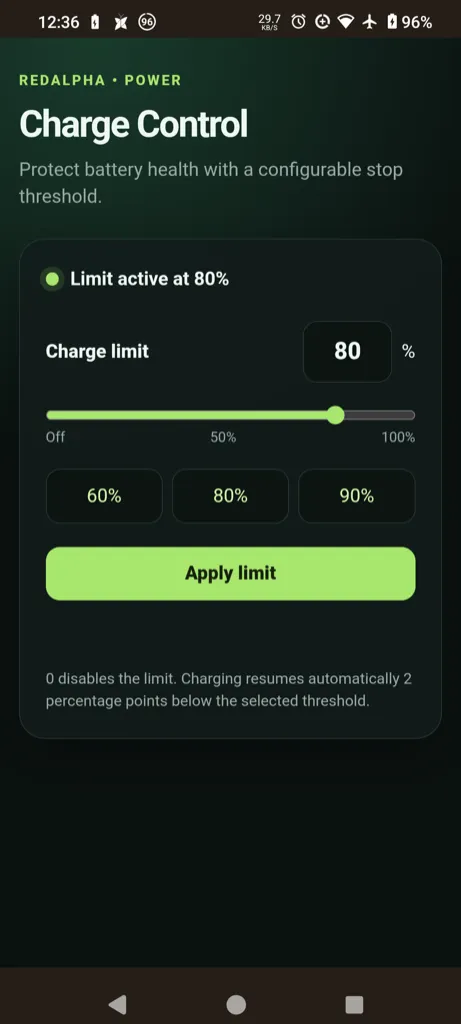
RedAlpha Charge Control is a systemless KernelSU module providing a WebUI to configure battery charge limits on the Poco F3. It directly interfaces with the RedAlpha kernel to stop charging at a precise percentage, preserving battery longevity.
Technical Details
This package manages the dedicated redalpha_charge_limit kernel interface to pause charging at a user-defined threshold without altering thermal levels, USB-PD, or hardware safety controls. The custom limit configuration is systemlessly stored in /data/adb/ and automatically reapplies during every device boot sequence.
Core Features of RedAlpha Charge Control
- Custom limits: Stop charging at any specific percentage between 1 and 100 to reduce battery wear.
- Automatic resume: Charging initiates automatically when the battery level drops two percentage points below the established threshold.
- Persistent settings: Configurations survive reboots by reading data directly from the systemless module directory.
- Isolated controls: Operates independently without impacting native charging current, float voltage, or safety protocols.
Support & Requirements
Requires a rooted Poco F3 (alioth) running the RedAlpha kernel and ReSukiSU or a compatible KernelSU Manager.
How to Install RedAlpha Charge Control
- Download the latest release
.zipfile to your device storage. - Open your ReSukiSU or KernelSU Manager application and access the Modules section.
- Select the "Install from storage" option and flash the downloaded file.
- Reboot your Android device and access the WebUI button in the manager to configure your limit.