

FPS Unlocker
@VOID_ADB
v4.7.0
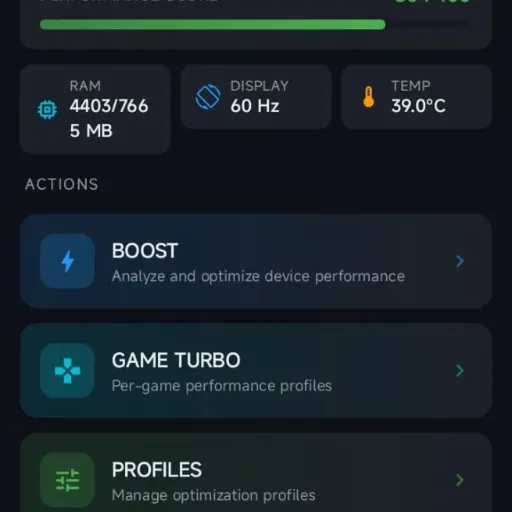
🚀 AXPerformanceEngine — NEW FULL UPDATE
After initial testing and feedback, AXPerformanceEngine has undergone a deep revision focused on one thing: making the functions actually do what they promise.
The goal of this revision wasn't simply to add more options to the interface, but to overhaul the architecture, commands, permissions, result validation, and compatibility across different Android versions and manufacturers.
AXPerformanceEngine uses the Shizuku UserService as an authorized backend to execute operations. The app does not rely on root and does not use a silent fallback for arbitrary command execution.
Furthermore, there is a command allowlist, package validation, and blocking of unauthorized commands or parameters, making execution much more controlled and secure.
The Game Profile was one of the areas that received the most attention.
Functions are now handled according to what Android actually allows to be executed, and the app attempts to validate the result whenever there is a reliable way to do so.
cmd game mode performance <game_package>. The function depends on the Android/OEM and the game's own support, requiring API 31 or higher. When the game does not support Performance mode, the app will inform you that the operation is unsupported instead of presenting a fake success.settings put system screen_brightness can be blocked, overwritten, or controlled by the manufacturer and automatic system policies. Therefore, the decision was to eliminate the function rather than keeping an option that only appeared to be functional.screen_off_timeout with backup and readback. The app verifies if the value was actually applied and tries to restore it later. Even so, specific manufacturer policies might override this setting.am kill-all as a best-effort operation via Shizuku. The function doesn't promise a specific amount of freed RAM, because the recovered memory depends on the actual state of the system.App Standby has also been revised.
Instead of using "global mode" concepts that don't match how Android actually works, the app now works with Standby Buckets on a per-package basis.
You can select an installed game and use:
The application uses:
am set-standby-bucket <package> <bucket>
And verifies it afterward with:
am get-standby-bucket <package>
Important: App Standby is not a boost mode. It controls background activity restrictions and can affect synchronization, alarms, and network connectivity.
The Wi-Fi Optimizer also received a more accurate implementation.
When available, it uses the Android Wi-Fi service:
cmd wifi set-scan-always-available enabled|disabled
And verifies it through:
cmd wifi get-scan-always-available
If the service doesn't offer the command, there is a fallback via wifi_scan_always_enabled, but the app only shows success when the SettingsProvider confirms the value.
The function specifically controls the availability of Wi-Fi scanning when Wi-Fi is turned off.
It does NOT promise to:
BLE Scan Always Available remains unsupported on generic Android without system privileges, so no fake changes are made.
This part has also been fixed.
Android does not provide a standard app with a universal API to mute notification channels of other apps. Because of this, the old switch has been removed.
Now, the app directs the user to the official Android settings related to notifications and Notification Policy Access. The final decision remains with the user and the Android system itself.
The System Optimizer now only works with operations that Android actually exposes through Settings or the shell, and that can be verified.
Among the revised functions:
setprop only when the change is accepted and verifies it through getprop.cmd netpolicy set/get restrict-background.am kill-all as a best-effort operation, without promising a specific amount of freed RAM.Quick Presets have also been revised.
The visual state should now only update after the corresponding operations return success. If an operation fails, the previous selection is preserved, and the user receives a message detailing the error or stating that a specific feature is unsupported.
This means the interface should not simply show:
✅ "Activated"
when the command wasn't actually executed.
The app uses the Shizuku UserService to send commands to the authorized backend.
The remote executor has an allowlist and blocks:
Per-package operations only accept names in a valid Android package name format. Furthermore, protected packages cannot be killed through cleanup operations.
The goal is not simply to say: "Android 12 = works."
Compatibility is analyzed by the actual observed capability of the device. Two devices using the same Android version can behave differently due to the manufacturer, ROM, security services, and power-saving policies.
Different environments were considered, including:
When an operation is not exposed by the device, the app will inform you that it is unsupported.
Sorry for the long text, but it is necessary that you read it. Well, this update took a long time, and I hope you like it! Please let me know if there are any bugs, errors, or any other issues.
It took a lot of work to do all of this. I've been working from midnight until now, 5:03 AM. Basically, I haven't slept. I did my absolute best to get everything working as smoothly as possible. 🙏❤️
AX Performance Engine has received an update bringing several improvements to Game Turbo, Game Profile, Display, and Shizuku. 🔥
🔥 More precision, organization, and stability for the AX Performance Engine.


Hermano, gran trabajo y dedicacion de esta aplicacion, espero siempre la mantenga funcionando al 100%, con funciones que realmente cumplan lo que prometen y no como muchas otras app, que tienen miles de funciones que simplemente no hacen nada o empeoran el rendimiento.

Vale, muchísimas gracias por el feedback 😸❤️🩹”

Eu notei um problema com o App relacionado ao shizuku, na interface aparece diagnóstico Shizuku e quando Clico em retry, carrega por um tempo e depois aparece que os serviços do Shizuku deram erro, sendo que o Shizuku está em execução e dei permissão para o App. Tentei resolver reiniciando o aparelho, a depuração USB e a depuração por wi-fi, mas de nada adiantou
Irei ver isso! 😸

Muito bom, irmão, continue assim 🤞🏻❤️
Is it necessary to use? I am already using all of your Ax plugins
Well, that depends on your choice! 😸
Hola buenas el modulo está bueno lo único es que derrepente se puso insistente ... Cerraba las aplicaciones como YouTube o más ... Y al entrar a shizuku había desaparecido la aplicación o su rastro .( No sé por qué tal error comenso a suceder pero aver si eso ya lo corregistes o en un futuro ya que si se restablece el teléfono debería resolver inconvenientes del módulo 👏pero exelente trabajo
Bom, obrigado pelo comentário! Hoje irei revisar todo o aplicativo e corrigir essas questões. Provavelmente, ele estará pronto amanhã. 🙏

VOID, AX Performance is a great app! It helped me a lot with gaming. I’ll tell you what I noticed while using your APK: I felt a significant improvement in touch sensitivity, especially in Battle Royale games and others. It also made my device feel lighter and faster. So far, I haven’t experienced any bugs. Your APK also improved my ping a lot in games. It used to be above 60–70 ms, and now it’s around 20 ms! The settings are great and very well thought out for different devices and games. 10/10! Your modules have also helped me a lot on my low-end device. I use all of them, but my favorites are VOID BATTERY, VOID CPU, and Aero Performance. Thank you for existing—you literally saved my potato phone 😂🔥
Bro I am using ax performance app . Should I have to delete the plugin first aero performance first ?
😸👍🌹
I really appreciate your comment! I’m glad my projects have been useful to you. If you ever need anything, I’m here. Also, I really liked one of your modules. 🤩👏
Pra mim o app funcionou muito bem, só uma coisa que toda vez que abro o app ele direciona pra a configuração' acessar dados de uso' mesmo com a permissão ativada
Okay, I’ll fix it.

There's bug in runtime with shizuku
Okay, I’ll fix it.