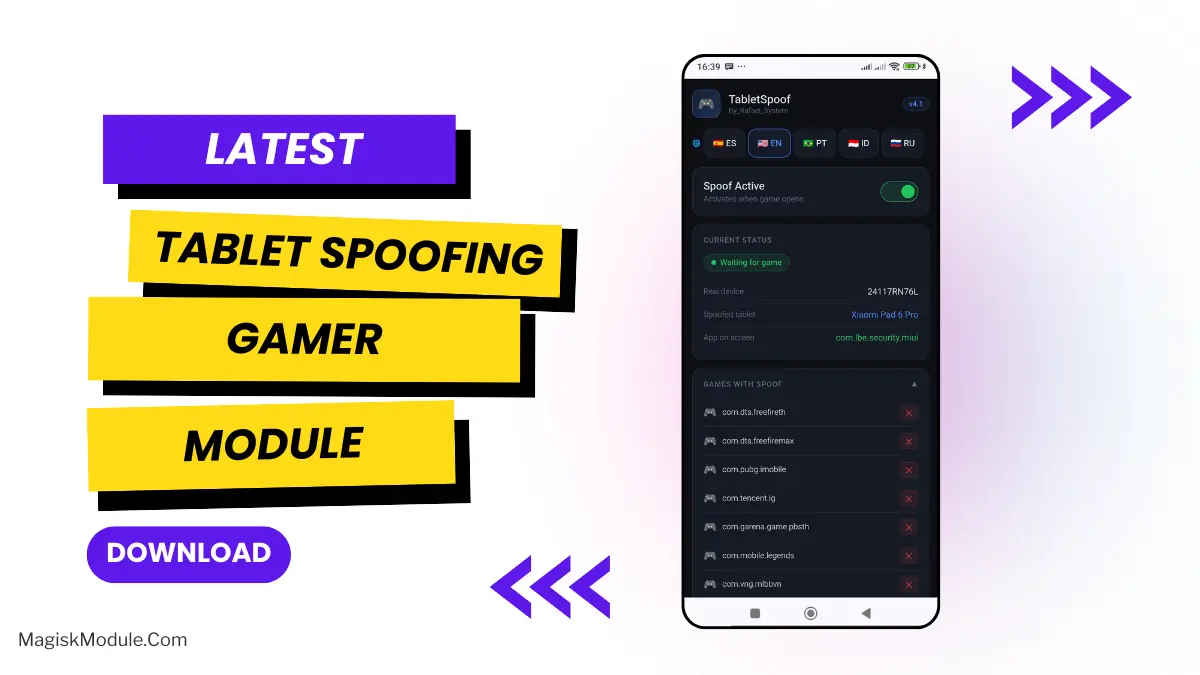
Tablet Spoofing Gamer

Tablet Spoofing Gamer

Rafael_System
5.0(0 ratings)
5 Downloads
5.0Version
13KBSize
Root ModulesCategory

About this module

###

How to Install?

  • Prerequisite: Ensure your device is rooted.
  • Open the Magisk Manager:

Tap on the Modules tab.

  • Tap the “Install from Storage” button and locate the zip file.
  • Flash The Module and Magisk will automatically flashing the zip file.
  • Reboot Your Device.

Is your small screen ruining your mobile gaming experience? Well, mine certainly was. I was introduced to the Tablet Spoofing Magisk Module a while back, and since then, I have been spoiled by the larger experience on my little mobile device. Clearly, tablet players have it best, but now you don’t have to actually be carrying around a full-sized tablet to have that advantage.

Deceives your games into thinking your are playing off of a expensive Tablet. Works very well and safe. Gives me a huge advantage in competitive games, even after re Installing the program, on my latest setup.

Unlike previous versions that only supported one profile (Xiaomi Pad 6 Pro), v5.0 includes five selectable profiles from the WebUI:

• Xiaomi Pad 6 Pro (tablet, DPI 240)

• REDMAGIC Astra — NP05J (gaming phone, DPI 240)

• ASUS ROG Phone 8 Pro (gaming phone, DPI 446)

• RedMagic 9 Pro — NX769J (gaming phone, DPI 446)

• Black Shark 5 Pro (gaming phone, DPI 392)

What's new in v5.0:

✔ Multi-profile with hot-reload (no reboot needed)

✔ Independent DPI toggle separate from props spoof

✔ WebUI in 5 languages: ES / EN / PT / ID / RU

✔ Real device field now displays correctly in WebUI

✔ WebUI banner layout bug fixed

✔ Compatible with Magisk, KernelSU and APatch

Features

  • Device Spoofing: The app makes your phone pretend to be a Xiaomi Pad 6 Pro, for specific games.
  • Higher Quality Graphics: Tablet-only graphics are enabled straight away on your device.
  • Wider Field of View (FOV): It helps so much, being able to see more allows you to spot enemies before they detect you.
  • Best performance optimization tool for Fortnite: Smoothes gameplay and dramatically improves performance.
  • Automatic Activation / Deactivation: Spoofing will only be active whenever you load up a target game and automatically revert back to normal as soon as you close said game.
  • System Safe: Temporary changes are made, so no changes are permanent to your system.
  • Integrated Management UI: Manage your Kernel Toggle(s) and Custom Game List(s) directly from the KernelSU WebUI or Magisk app interface.
  • Can Add Any Game: Beyond the list of supported games that comes with the program, you can add as many games as you wish to your custom game list.

If you want to push your Android phone to the limit and get a competitive edge then I would recomend this product.

Rate this module

More from Rafael_System

View all
Crocus Vernus

Crocus Vernus is a lightweight, reversible tuning module that makes your device noticeably smoother and more responsive during gaming and multitasking. Enjoy a more responsive gaming and multitasking experience through intelligent adjustment of system parameters in the kernel and memory. Developer: @illumi

117Root Modules
By @bot
Abandon Engine

Step-by-Step Installation: - Active AxManager: First, you need to make sure it is active. - Install via AxManager: Open the AxManager. - Tap on the “Plugin” section. - Click “Install from Storage” and locate the geted file. - Confirm the installation.. - Reboot Your Device After installation. How to Active AxManager To use AxManager, you'll need to enable Developer Options on your device: - Turn on Wifi - Go to Settings > About Phone. - Tap Build Number seven times to unlock Developer Options. - Open the AxManager, Click “Need To Active”. - Enable Notification & Click Start Button. - Click Wireless debugging & Enable Wireless debugging. - Click Pair device with pairing code. - Click on "Enter Pairing Code" above and paste the WiFi pairing codes there. This is a file for AxManager. It’s not a Magical wand but a way to organize your phone by sleeping some non-essential system processes just like the above post said and that will help improve your battery life without rooting your Infinix, Tecno, itel and other Android phone. Features: - The file is compatible with Infinix, Tecno and itel smartphones. - Limited alterations to standard setup to maintain optimum performance and stability. - Improves system handling without heavy, complex tweaks. - Works seamlessly with stock Transsion ROMs. - Low usage of system resources to preserve your battery and daily performance. - Simply Enabled/Disabled through the AxManager program. - Reduces unneccessary background usage of phone resources.

243AxManager Plugin
Mitsu Battery Angel

How to Use Root Users? - Ensure Root Access: The first prerequisite is having root access via a custom recovery. - Install via Magisk Manager: Open the Magisk Manager. - Tap on the “Modules” section. - Click “Install from Storage” and locate the geted file. - Confirm the installation and allow the module to apply the necessary changes. - Reboot Your Device: After installation, reboot your device & KSUWebUi Recommended to activate this. The Mitsu Battery Angel is a lightweight background utility module designed to extend device screen-on time and manage power efficiency. It actively scales CPU frequency and restricts background app drain to improve overall thermal management and standby longevity. I've been running this for the last few weeks to see if it actually replaces carrying a heavy power bank everywhere I go. My phone easily pushes through a full day of heavy scrolling and messaging, dropping significantly less charge while sitting idle overnight. - Cuts down CPU activity to keep power consumption strictly under control. - Aggressive background restriction stops sneaky apps from draining your charge while the screen is off. - Better thermal management keeps the hardware running cool during extended daily use. - Dramatically improves standby time, meaning you lose fewer percentages overnight. - A lightweight footprint ensures the tool itself does not hog valuable system memory. - Supports long-term health by balancing active performance with deep battery savings. If you are tired of constant battery anxiety, applying this via your root manager or AxManager is an absolute no-brainer. It gives your device the extra endurance it needs without suffocating basic performance.

167Root Modules
Bnoop Boost | BBoost

Step-by-Step Installation: - Active AxManager: First, you need to make sure it is active. - Install via AxManager: Open the AxManager. - Tap on the “Plugin” section. - Click “Install from Storage” and locate the geted file. - Confirm the installation.. - Reboot Your Device After installation. How to Active AxManager To use AxManager, you'll need to enable Developer Options on your device: - Turn on Wifi - Go to Settings > About Phone. - Tap Build Number seven times to unlock Developer Options. - Open the AxManager, Click “Need To Active”. - Enable Notification & Click Start Button. - Click Wireless debugging & Enable Wireless debugging. - Click Pair device with pairing code. - Click on "Enter Pairing Code" above and paste the WiFi pairing codes there. Changelog >> - Add Downscale Factor (App Only) - Add FPS / Hrz Scale - Adjust Game set-fixed-performance logic - Add power save (Adjustable) logic - Add some tweaks OEM and MIUI flags (OEM flags still testing) - Add clear button for Check log window Features - Acts as an Android RAM cleaner, freeing up precious memory so your system can breathe. - Works to improve CPU efficiency, making sure your processor isn't wasting effort on pointless tasks. - Gives your Android performance a major optimization, smoothing out the overall experience. - Helps speed up the Android GPU, which means smoother visuals and scrolling. - Automatically clears out those resource-hogging background apps you forgot were even running. - The final result? A seriously improved Android phone speed. Everything feels zippier and more responsive. Developer: @Brains82

281AxManager Plugin

Comments (0)