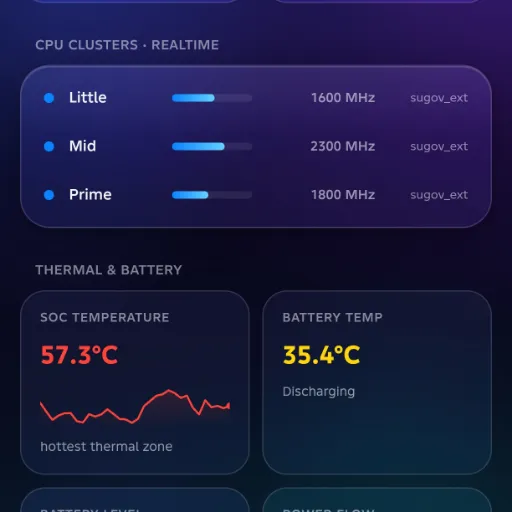

DIMENSITY PERF (PerfMTK) is a native systemless module for MediaTek devices with Mali GPUs. Using Magisk, KernelSU, or APatch overlays, it controls CPU clusters, GPU clocks, memory buses, touch digitizers, and thermals for 120 FPS gaming and battery endurance.
Technical Details
Under the hood, the native C daemon (perfmtkd) runs an event-driven epoll reactor across two threads—consuming under 3.0 MB RSS and 0.0% idle CPU—with in-memory config caching and 4-tier foreground app detection (PerfMTK-Hook, Netlink cn_proc, and cgroup.procs inotify) for sub-millisecond profile switching. Deployed systemlessly through root module filesystem overlays, it directly tunes MediaTek CPU clusters, Mali GED HAL, LPDDR5X DVFSRC, and FPSGO so users can bypass OEM throttling and maintain consistent frame rates across Xiaomi, OPPO, Vivo, Samsung, Motorola, Transsion, and AOSP builds.
Core Features of DIMENSITY PERF
- Hardware Tuning: Adjusts All-Big-Core, Tri-Cluster, and Dual-Cluster CPU topologies alongside Mali GPU frequency margins, LPDDR5X DRAM clocks up to 8533 MHz, MediaTek GBE, FPSGO sysfs, and UFS storage governors.
- Touch Booster: Unlocks sustained 480Hz/500Hz touch sampling via kernel digitizer
ioctl, integrates host-sideTHP Smoothfiltering, isolates Sensor HAL to dedicated Little VIP cores (Cores 2-3), and prevents frame preemption on Big cores for 120 FPS gaming. - Charge Bypass: Probes PMIC hardware to enable fast-charge thermal bypass that keeps cells at 31°C–36°C during heavy gaming, paired with a configurable 45°C–55°C emergency cutoff and 50%–100% Battery Care charge ceiling.
- Terminal CLI: Bundles the root
perfmtkdashboard for live JSON telemetry, profile switching (performance,balanced,powersave,powersave+), configuration backup/restore, and integration with thePerfMTK-Managercompanion app.
Support & Requirements
Requires a MediaTek SoC with a Mali GPU running Android 9.0 to Android 16 (Linux Kernel 4.14.x–6.1.x+) rooted via Magisk (v27+ recommended), KernelSU, or APatch (with Hybrid Mount or Mountify for KernelSU and APatch).
How to Install DIMENSITY PERF
- Download the latest PerfMTK release
.zipfile from the official GitHub repository. - Open Magisk, KernelSU, or APatch, go to the Modules menu, and flash the downloaded
.ziparchive. - Wait 10 seconds (or press
VOL-) for automatic Express Mode setup, or pressVOL+within 10 seconds for Custom Mode (system.prop,post-fs-data.sh, orservice.sh). - Reboot your device to apply all kernel and
perfmtkddaemon settings.
Disclaimer: This module alters low-level hardware registers and kernel interfaces; despite built-in thermal and voltage safeguards, the developers assume no liability for hardware damage or instability from improper use.
Reviews (0)
No reviews yet. Be the first to review!