Updated to Crazy Ui and tweaks🎉
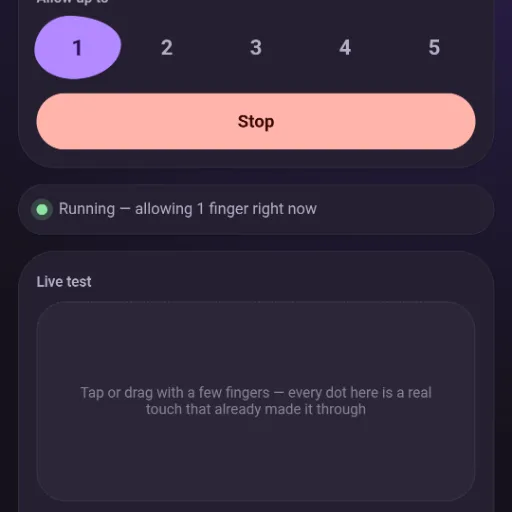
Sometimes an Android touchscreen reports touches that never actually happened: several fingers appearing out of nowhere, or one spot that gets stuck and won't let go, usually needing a reboot to clear. TouchGuard catches these the instant they happen and quietly discards them before your apps ever see them. Everything you actually do with your own fingers — tapping, swiping, holding, multi-finger gestures — passes through exactly as normal, completely untouched.
No background service draining your battery, no accessibility permission watching what you do. It works at the lowest level Android has for touch input, filtering right there before anything else even gets a chance to see the fake touches.
What's New in v3.7
Includes significant bug fixes to cut syscall overhead during actual bursts.
To keep optimizing the module for lag complaints, the hot path was analyzed for real, structural costs. A major bottleneck was identified: read() was pulling exactly one event per syscall, every time, no matter how many were already queued and ready. That cost scales with the event rate, meaning it's worst precisely during a genuine ghost-touch burst—rapid, chattery, multi-slot activity is exactly a high syscall-rate scenario, and exactly when lag gets reported.
The Fix:
- Changed to pull whatever is actually queued (up to 64 events) in one
read(), then process each one individually afterward with the exact same per-event logic. - Result: Verified with an isolated test (150 events in a burst): 3 real syscalls instead of 150. Strict order is preserved, and nothing is lost or duplicated across the refill boundary.
- Latency safeguard:
poll()must never run while there is still buffered, unprocessed data sitting locally (which could add up to 500ms of pointless delay). Restructured sopoll()and the underlyingread()only happen once the local buffer is actually exhausted; a still-full buffer skips straight to the next event with zero added latency.
Features
- Blocks touch bursts above a limit you choose (1–5 fingers).
- Auto-hides a stuck contact that's been motionless far longer than any real touch would be — no reboot needed.
- Live status, finger-count control, and logs, all from a clean in-app control panel.
- Five themes: Liquid Glass, Material Expressive, Dark, Light, or follow your system setting.
- Checks for updates on its own — both in your root manager's module list and inside the app.
- No noticeable delay added to normal touches.
Requirements
- A rooted Android device (arm64) with Magisk or a KernelSU-family manager (KernelSU, SukiSU, etc.).
- Nothing else — no Termux, no compiler, nothing to set up first.
Installation
- Download the zip attached to the Telegram post (or grab it from GitHub Releases below).
- Flash it from your root manager's Modules tab, same as any other module.
- Reboot your device.
- Open TouchGuard from your manager's module list to access the control panel.
Troubleshooting & Safe Mode
If anything ever goes wrong:
Reboot and hold Volume Down at the boot logo for Magisk Safe Mode. This disables every module, including this one, requiring no touch input.
TouchGuard's grab on the real screen and its virtual replacement both live in their own process. If it ever crashes or the phone reboots, the kernel cleans both up automatically and normal touch comes back on its own — there is no state it can leave your touchscreen in that survives a reboot.
Source, Changelog & Updates
- GitHub Repository: shivrajtode/TouchGuard
Every version's full history — every bug found, what didn't work, and why the fix that stuck actually did — is available in the repository's CHANGELOG.md if you want the whole story.
Credits
Built by Shivraj — @Shivraj_editx
Reviews (0)
No reviews yet. Be the first to review!