| App Name | Android Enhancer |
|---|---|
| Size | 7.4MB |
| Version | Final |
| Category | Ported App |
| Android requirement | + 6.0 |
| Developer | iamlooper |
| Rating | 4.9 / 5 |
| Price | Free |
Get Link
Step-by-Step Installation
- How To Install:
- Enable “Unknown sources” in your device’s settings
- Open your device’s file manager
- Find the APK file
- Tap the APK file to install the app
- Confirm the installation
- Grant necessary permissions via Magisk / KernelSu Next / APatch.
Let’s be real. My phone is a battlefield. One minute I’m crushing foes in a game, the next I’m scrambling for a charger because the battery vanished. Sound familiar? I was fed up, so after rooting with Magisk, I tried the Android Enhancer app. Honestly, it’s become my device’s secret control panel.
Features
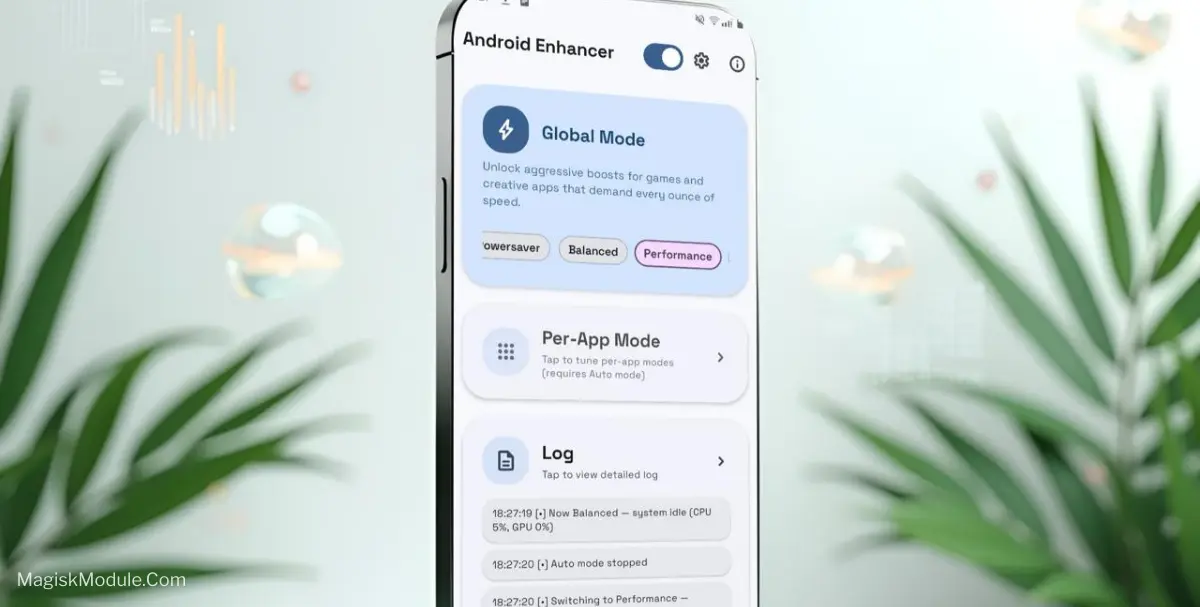
This isn’t just another booster app. It gives you preset modes that actually make sense. You switch them based on what you’re doing:
- Auto: Let it handle things. It’s surprisingly smart.
- PowerSave: For when you’re just scrolling. It really stretches the last 20%.
- Balance: My daily driver. Perfect mix of smoothness and battery.
- Performance: For heavy editing. Things get snappy.
- Gaming: This is where it shines. It kicks in the good stuff.
That “good stuff” includes an GPU/CPU tuning, and a RAM cleaner. The Game Network Stabilizer is a game-changer (pun intended). I’ve noticed fewer sudden lag spikes in online matches.
Here’s the kicker: the Game Mode Booster bundles all these tweaks into one tap. I tap it, launch my game, and the difference is tangible. It feels like the phone stops babysitting background apps and pours all its love into the game.
Look, rooting isn’t for everyone it voids warranties and you need to follow trusted guides for Magisk or KernelSu. But if you’re already rooted and want to truly command your device’s performance and battery, this app is a logical, powerful tool. For me, it fixed the “gaming or battery life” dilemma. Now I get more of both.