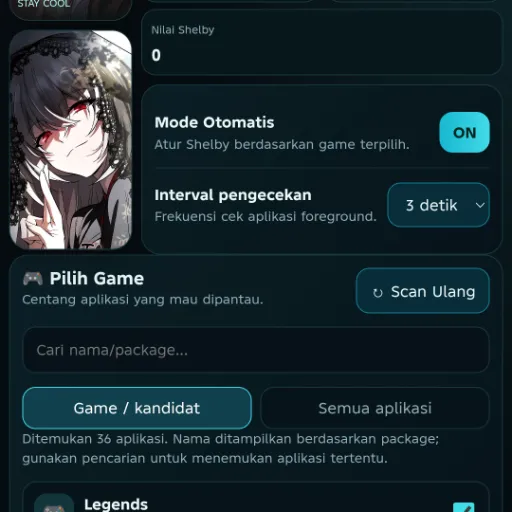
HyperPerf+ is a universal kernel and system configurator module designed for HyperOS, MIUI, and compatible AOSP devices running on Snapdragon or MediaTek chips. It utilizes a strict opt-in configuration approach, ensuring no system values or default parameters are modified until explicitly enabled through its WebUI.
"When running this on my Redmi Note 13 Pro, the new real-time stats tab made monitoring CPU temps and battery drain during heavy gaming incredibly easy. I love that it leaves my stock governors and schedulers alone unless I actually check the activation box, preventing random system instability"
Core Features
- Strict Opt-In System: Ensures stock build.prop and kernel defaults remain completely untouched until you actively toggle them on
- Active VoLTE Protection: Automatically monitors call states in the background and adjusts TCP variables to prevent IMS connection drops while on a call
- Live Stats Dashboard: Displays real-time rolling charts for per-core CPU usage, battery charge current, and SurfaceFlinger (SF) FPS right in the dashboard
- Universal SoC Support: Works seamlessly across both Snapdragon and MediaTek hardware running modern MIUI or HyperOS firmware
- Clean Uninstallation: An automated uninstall script wipes out all leftover persist props, animation scales, and database modifications the moment you remove it from Magisk or KernelSU
Changelog v7.4
Fixes and Improvements
- Thermal Section Fix: If your kernel lacks a thermal profile, the module will simply skip this option and provide a notification, without causing errors or system freezes
- Anti-Blur System Improvements and Fixes: Previously, the blur feature could be toggled on or off without clear control, sometimes causing the interface to break. Now, there are two explicit modes: BLUR_OFF=1, BLUR_OFF=0
- Languages, Translations, and New Entries: Each entry now includes function, default value, recommended ranges, and a reference to the corresponding kernel node, 796 labels in the interface are now translated across all three supported languages
- Background Process Limits: These now correctly trigger the settings_enable_monitor_phantom_procs monitor instead of having no effect
- Freezer: Keys that did not exist in Android have been replaced with the correct ones (settings global cached_apps_freezer + device_config use_freezer), obsolete keys are automatically cleaned up
- Stock Status: When installing over previous versions, the "Stock" status is displayed correctly, configurations saved in earlier versions remain functional, the interface now displays the actual "stock" value for any system option
- Doze (Idle Mode): Settings are no longer incorrectly flagged as modified
- Option Descriptions: All descriptions have been updated to explain the function, default value, and recommended ranges for each setting, each option now indicates what it modifies
New Features and Sections
- Settings and Guide: 12 content cards, plus a snapshot frequency card, includes architecture, limits, and a glossary
- New snapshot feature: You can choose the frequency at which a system snapshot is taken when applying changes
- Unified Apply Button: The log and the Apply button now function as a single unit across both pages
- CPU cluster detection: Settings are applied to the correct cluster (little / mid / big / prime) without conflicts
- MediaTek section: Now includes PPM, GED, GBE, gpufreq, Mali, and HPS (for MediaTek SoCs only)
- Advanced scheduler: BORE (burst cache/offset/scale/long/short), deadline, energy-aware, PELT, and round-robin
- ANGLE: Force the OpenGL ES to Vulkan driver on a per-app or system-wide basis, with an option to reset
- Networking and I/O: Read-ahead, rotational settings, request queue depth, no-merges, iostats, RQ tuning, and add_random
- Audio: AVSync latency, binder size, 3D jack mode, buffer and offload tracking, and software-based audio assistance
- Backup and restore: You can now save and restore your configuration directly via the WebUI without need for recovery-mode operations
- Module action button: Resets everything to a clean state without requiring you to uninstall the module
- Privacy and Telemetry section: Includes a collection of relevant options
- I/O presets: I/O queue presets that apply various settings across all partitions like sda, sdb, etc
Changelog v7.3
New Features & System Tweaks
- Audio Optimization: Added controls for AVSync latency, binder size, jack 3D mode, audio latency, buffer and offload track, and software assist
- Configuration Management: Backup and restore your configurations directly from the interface
- Module Action Button: Instantly restore the system to a clean state without needing to uninstall the module
- Localization: Automatic language selection based on your device's system settings
Advanced Kernel Section
- Expanded Controls: More than double the available parameters, covering CPU, GPU, governor-specific tunables, scheduler, memory, I/O, vibration, sound, LED, misc, display, and Klapse
- MediaTek Integration: Dedicated pages for PPM, GED, GBE, gpufreq, Mali, and HPS
- Intelligent Cluster Detection: Automatically detects cluster topologies and applies tunables to each frequency policy without conflicts, settings not supported by your specific kernel are automatically hidden
- Scheduler & Memory Grouping: Deep memory and scheduler settings are now consolidated under Kernel (includes dirty, min_free, overcommit, watermarks, ASLR, MGLRU, zswap, thermal, KSM, Dynamic Fsync, refresh, boost, and uclamp)
Interface Enhancements
- Node Transparency: The modal for each row now displays the actual sysfs node path and the exact current values on your device
- Governor Persistence: Removed the duplicate governor row, the selector now resides cleanly in the tunables block, lists only your kernel's actual available governors, and persists across reboots
- UI Polish: Fixed expandable sections overlapping or cutting off during loading, screen rotation, or language changes, long descriptions now only open via an info button to prevent UI bloat
- Error Logging: The Apply button no longer fails silently, errors are now accurately recorded in the log
- Rewritten Documentation: All 157 descriptions in the Tweaks tab and 60 in the Kernel tab have been rewritten in Spanish and English
Core Fixes
- Background Process Limit: Fixed an issue where the limit had no effect on modern Android, it now properly activates the monitor allowing the system to kill CPU-consuming background apps
- App Freezer: Replaced invalid keys with correct Android framework commands that apply instantly, persist across reboots, and automatically clean up old keys
- State Detection: The default Doze state no longer incorrectly marks the configuration as modified, installs over older versions now correctly recognize the Stock state
Changelog v7.1
apply_tweaks.sh & service.sh Updates
- Dynamic Cluster Detection: Automatically detects little/big clusters by comparing the actual cpuinfo_max_freq of each core (with a half/half fallback), smaller frequencies are now correctly applied at boot
- ZRAM Optimization: Only performs swapoff/reset if the size or current algorithms differ, avoiding Out-Of-Memory (OOM) errors when reapplying
- Toggle Respect: CRC_OFF, BAT_RR, BAT_FS_SYNC_OFF, and GFS_OFF now properly respect configuration values
- Wakelock Logic Update: Portable logic implementation using [ "$var" = "1" ]
- Input Boost: Now uses the dynamically detected CPU clusters instead of a fixed limit
- VoLTE Fallback Chain: Uses voice.ril.telephony.call.state, gsm.call_state, dumpsys telephony.registry, if the service restarts during a call, states are restored from the configuration file
Web UI & Installation
- Dynamic CPU clusters in the Apply panel
- ZRAM reset skipping to prevent swap interruptions
- HTML escaping added in log and sLog
- Regenerated hpfast.sh v6 with actual per-core frequencies
- Backup and Restore: Backups pre-installation animation scales (orig_anim.conf), restoring original values upon uninstallation instead of forcing 1.0
Changelog V7 (HyperOS / AOSP)
- Safer Configuration Path: .conf files are now saved in /data/adb/hyperperf/hypervulkan.conf instead of the module root directory, keeping user configurations safe across module updates
- Improved Interface: Device information is now displayed using separate monitors rather than a flat list
- New Options: Added several TCP options, scheduler settings, and status/stock value indicators for all options
- Bug Fixes: Corrected interface errors and issues where props weren't being applied after restoring a .conf file
Changelog v4.0
- AOSP Edition (BETA): MIUI options are grayed out, fully functional on AOSP ROMs
- System Info Panel: Displays Kernel, SoC, GPU, RAM, battery, and temperatures
- Advanced Performance Controls: Input Boost (Little/Big frequency and duration), Core Control, GPU Governor, and Stune Boost
- System Tweaks: USB Fast Charge, Dynamic Fsync, Power Efficient WQ, KSM, and VM Advanced controls
- TCP Enhancements: Added tcp_timestamps and tcp_slow_start_after_idle
- i18n & Stability: Added missing descriptions across all 3 languages, with config read and init wrapped in try/catch error handling
Changelog v3
- Key Enhancements: SF Reuse Layer Content functionality fixed, BETA badge in Stats visible from the start, proper loading of Spoof Identity and BORE in the WebUI, separate schedulers for SDA and DM-0, CPU Frequencies control (Little/Big min/max)
- Advanced display & performance options: SF Multithread, Frame Rate Priority/Override, Predict HWC, Graphite, Context Priority, No VSync screen off, Threshold, and uclamp.min
- Advanced TCP stack tweaks: Thin-Stream TCP (linear + dupack), No Metrics Save, Qdisc, Buffer max, TCP Low Latency, and Keepalive
- Surround sound enabled on speakers
- New option badges that auto-disappear after use
- Russian language support (BETA)
- Boot Loop / Random Device Fixes: Reduced boot_completed timeout loop cut from 60 to 3 iterations, commented out the ro.modversion line to prevent device boot issues
Verdict
If you run HyperOS, MIUI, or compatible AOSP ROMs and want granular, safe control over your kernel parameters without forced global tweaks, HyperPerf+ is an essential tool. It puts the power entirely in your hands while keeping essential phone functions perfectly stable