About this module
###
Video Tutorial
Step-by-Step Installation
- How To Install:
Enable "Unknown sources" in your device's settings
- Open your device's file manager
- Find the APK file
- Tap the APK file to install the app
- Confirm the installation
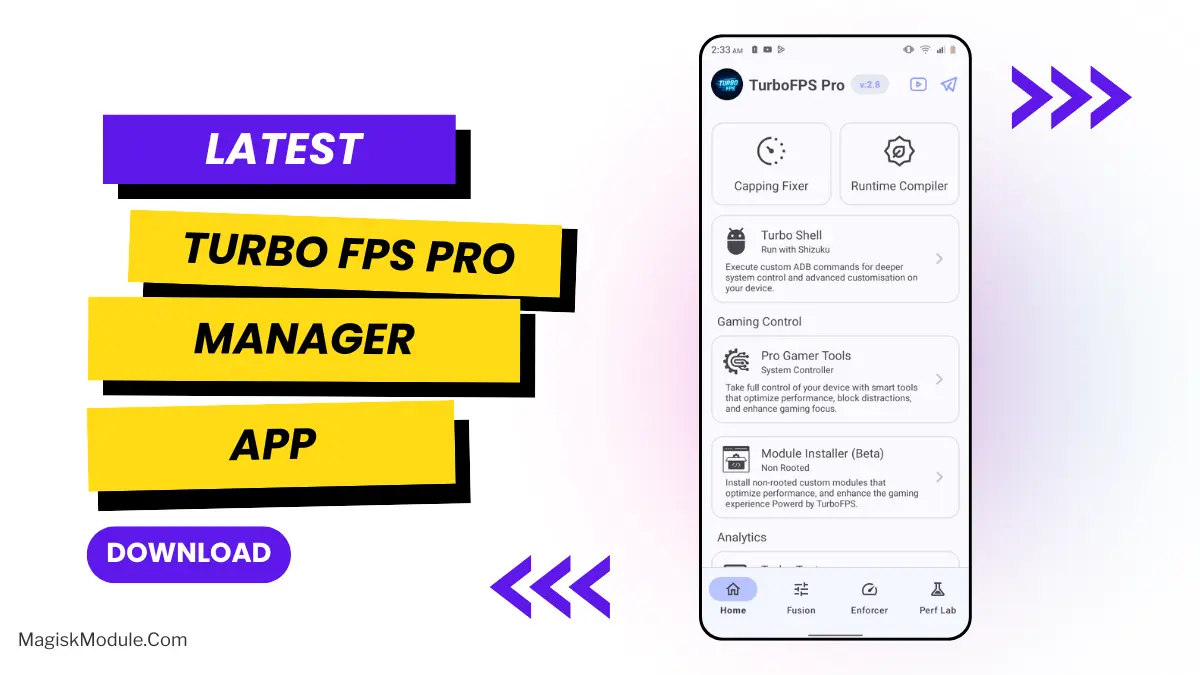
We've all been there: right in the running match and the game suddenly freezes. To avoid this from happening, I tried the Android Game Turbo app that is now available as a trial version. It is not just another power-up, because this Android App greatly optimizes your smartphone for games. The app works like a team of five specialized workers (driver’s, mechanics, etc.) that are busy fine-tuning your Android Game for maximum speed.
Features
- Real-time CPU & GPU Boost: Gives your phone's brain and graphics a rapid boost - allowing your applications to run faster and your battery to last longer.
- Seriously, One Tap Lag Reduction: Seriously, just one tap of a button clears all of the digital junk out of RAM, eliminating Lag caused by old applications lingering around.
- Smart Network Optimization: No Wi-Fi spikes here. Play smoothly with optimized Ping. Say goodbye to that one guy who suddenly teleports across the map.
- In-Game Floating Toolbox: Quickly modify game settings within the game itself by utilizing the in-game floating toolbox, all accessible right on the screen without having to exit out. A floating bubble on the screen gives you direct access to numerous settings. So handy.
- Advanced Cooling Control: Our technology ensures your phone doesn't feel like a hot potato and allows for extended gaming with an intelligent cooling system that helps prevent throttling.
- Custom Game Modes: Choose maximum performance for ranked matches or a battery-saver mode for casual gameplay.
- App Cleaner & Memory Boost - Clean your phone in a matter of seconds and get the most out of RAM to play your games faster and smoother.
- FPS Stabilizer: This feature prevents sudden FPS drops, which is especially useful during intense firefights and will keep even the most resource-intensive game running smoothly.
Seriously automated game frame capture and best fit resizing. The software does an excellent job of auto-optimizing - I didn't really notice it running in the background, which is how I like it. Just start your games and it will do the rest!
Rate this module
More from Zx Tweaks
View allCrocus Vernus
v5.5.0Crocus Vernus is a lightweight, reversible tuning module that makes your device noticeably smoother and more responsive during gaming and multitasking. Enjoy a more responsive gaming and multitasking experience through intelligent adjustment of system parameters in the kernel and memory. Developer: @illumi
Abandon Engine
FinalStep-by-Step Installation: - Active AxManager: First, you need to make sure it is active. - Install via AxManager: Open the AxManager. - Tap on the “Plugin” section. - Click “Install from Storage” and locate the geted file. - Confirm the installation.. - Reboot Your Device After installation. How to Active AxManager To use AxManager, you'll need to enable Developer Options on your device: - Turn on Wifi - Go to Settings > About Phone. - Tap Build Number seven times to unlock Developer Options. - Open the AxManager, Click “Need To Active”. - Enable Notification & Click Start Button. - Click Wireless debugging & Enable Wireless debugging. - Click Pair device with pairing code. - Click on "Enter Pairing Code" above and paste the WiFi pairing codes there. This is a file for AxManager. It’s not a Magical wand but a way to organize your phone by sleeping some non-essential system processes just like the above post said and that will help improve your battery life without rooting your Infinix, Tecno, itel and other Android phone. Features: - The file is compatible with Infinix, Tecno and itel smartphones. - Limited alterations to standard setup to maintain optimum performance and stability. - Improves system handling without heavy, complex tweaks. - Works seamlessly with stock Transsion ROMs. - Low usage of system resources to preserve your battery and daily performance. - Simply Enabled/Disabled through the AxManager program. - Reduces unneccessary background usage of phone resources.
How to Use Root Users? - Ensure Root Access: The first prerequisite is having root access via a custom recovery. - Install via Magisk Manager: Open the Magisk Manager. - Tap on the “Modules” section. - Click “Install from Storage” and locate the geted file. - Confirm the installation and allow the module to apply the necessary changes. - Reboot Your Device: After installation, reboot your device & KSUWebUi Recommended to activate this. The Mitsu Battery Angel is a lightweight background utility module designed to extend device screen-on time and manage power efficiency. It actively scales CPU frequency and restricts background app drain to improve overall thermal management and standby longevity. I've been running this for the last few weeks to see if it actually replaces carrying a heavy power bank everywhere I go. My phone easily pushes through a full day of heavy scrolling and messaging, dropping significantly less charge while sitting idle overnight. - Cuts down CPU activity to keep power consumption strictly under control. - Aggressive background restriction stops sneaky apps from draining your charge while the screen is off. - Better thermal management keeps the hardware running cool during extended daily use. - Dramatically improves standby time, meaning you lose fewer percentages overnight. - A lightweight footprint ensures the tool itself does not hog valuable system memory. - Supports long-term health by balancing active performance with deep battery savings. If you are tired of constant battery anxiety, applying this via your root manager or AxManager is an absolute no-brainer. It gives your device the extra endurance it needs without suffocating basic performance.
Bnoop Boost | BBoost
FinalStep-by-Step Installation: - Active AxManager: First, you need to make sure it is active. - Install via AxManager: Open the AxManager. - Tap on the “Plugin” section. - Click “Install from Storage” and locate the geted file. - Confirm the installation.. - Reboot Your Device After installation. How to Active AxManager To use AxManager, you'll need to enable Developer Options on your device: - Turn on Wifi - Go to Settings > About Phone. - Tap Build Number seven times to unlock Developer Options. - Open the AxManager, Click “Need To Active”. - Enable Notification & Click Start Button. - Click Wireless debugging & Enable Wireless debugging. - Click Pair device with pairing code. - Click on "Enter Pairing Code" above and paste the WiFi pairing codes there. Changelog >> - Add Downscale Factor (App Only) - Add FPS / Hrz Scale - Adjust Game set-fixed-performance logic - Add power save (Adjustable) logic - Add some tweaks OEM and MIUI flags (OEM flags still testing) - Add clear button for Check log window Features - Acts as an Android RAM cleaner, freeing up precious memory so your system can breathe. - Works to improve CPU efficiency, making sure your processor isn't wasting effort on pointless tasks. - Gives your Android performance a major optimization, smoothing out the overall experience. - Helps speed up the Android GPU, which means smoother visuals and scrolling. - Automatically clears out those resource-hogging background apps you forgot were even running. - The final result? A seriously improved Android phone speed. Everything feels zippier and more responsive. Developer: @Brains82